
The Gaps Report helps you identify unbookable gaps between reservations caused by current minimum night settings. You can activate gap suggestions and optionally apply rate adjustments. Any changes to minimum nights will be set as "Lock Nights", meaning future Season updates won’t override these restrictions. If you use dynamic pricing, be aware that any changes you make here can be overridden by those services.
Gaps Report
You can locate your Gaps Report in Homhero under the Reports tab in your Homhero Menu.
Understanding the Gaps Report
Often your listings will have minimum night restrictions applied. This can result in gaps between bookings that are less nights than the minimum night ruleset you have applied to your availability.
For example, it may be a 7 night minimum booking over this peak period, but now you have a 4 night gap between bookings. These four nights are now not bookable.
The new Gaps Report will list all of the unbookable gaps for your properties and give you actionable items to remove these restrictions without compromising the pricing needed to accept that booking.
Homhero will identify these gaps and allow you to select and approve the change to the minimum nights, opening those dates back up for bookings.
Homhero will also suggest a new nightly rate which will maintain the same booking value as a booking made on the original length of stay.
How to update Gaps in Bulk
There is a checkbox to the left of the suggested gaps which will allow you to update them all in bulk.
- Select the gaps you want to update in bulk.
- Click Bulk > Apply.
- Toggle Apply Rate Updates 'ON' if you wish to apply rate changes along with minimum night updates.
- Click OK to proceed.
- Click Cancel to exit without making changes.
- You will receive a success message that confirms all updates gaps. Click OK.
Reversible Gaps
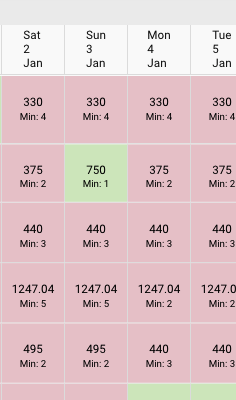
The Gaps Report also highlights reversible gaps — these occur when a previously filled gap becomes available again due to a booking cancellation, effectively removing the original gap. To help you maintain accurate pricing and minimum night settings, Homhero will detect these reversible gaps and give you the option to revert any changes made during the original gap update.
See below:
Gaps Report Settings
You can schedule a daily email to receive the Gaps Report Notification. This is a helpful report to identify available gaps in your calendar, allowing you to adjust minimum night settings to increase your chances of securing a booking.
- Click Settings from your Homhero side menu.
- Ensure you're on the General Settings tab.
- Click on Daily Report tab.
- Click the tickbox to activate the Gaps Report.
- Enter the number of Min Night Gaps e.g. 2 will only show gaps of 2 nights or more.
- Enter the email addresses of who the report should be sent to under Recipients. You can enter multiple email addresses by separating them with a comma.