1. Click Booking Engine and then click Special Rates from the HomHero sidebar
2. Ensure you're on the Last Minute Rates tab
3. Click Add
4. Ensure the toggle is Active
5. Enter a Special Name
6.. Enter the number of Days before Booking the special applies to
7. Enter the Min Nights of a reservation that this special will be available for
8. Click the Days of the Week that the special is applicable for
9. If the special is based on a specific Discount Amount enter this amount here
10. Click the drop-down arrow and select the Discount Type:
% Percent i.e. 20 percent off discount
Fixed Discount Per Night i.e. $20 off per night
Fixed Discount Per Stay i.e. $20 off per reservation
Fixed Price Per Night i.e. $20 per night
Fixed Price Per Stay i.e. $20 per reservation
11. Click the Cumulative toggle if the special is to be used with other deals, this will default to off so this special cannot be used with other deals.
12. Click the drop-down arrow to select which categories apply, if the deal applies to all categories leave this blank
13. Click the drop-down arrow to select which seasons apply, if the special applies to all seasons leave this blank
14. Click Set to select which listings can be used for this special or leave blank to apply to all listings.
15. Click the OTA Options tab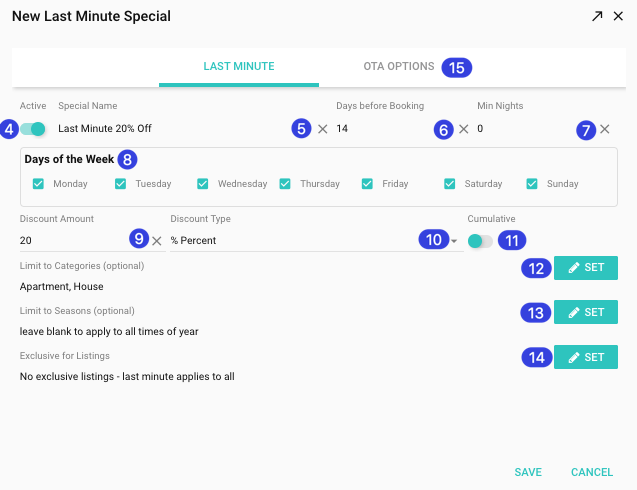
16. Click the toggle to make the deal Active on your Website
17. Click the toggle to make the deal Active for your Direct reservations
18. Click the toggle to make the deal Active on Airbnb
19. Click the toggle to make the deal Active on Vrbo
20. Click the toggle to make the deal Active on Booking.com
21. Click the toggle to make the deal Active on Staymakers
22. Click the toggle to make the deal Active on Marriott
23. Click Save
Adding a New Last Minute Rate

Alana
- Updated